Introduction
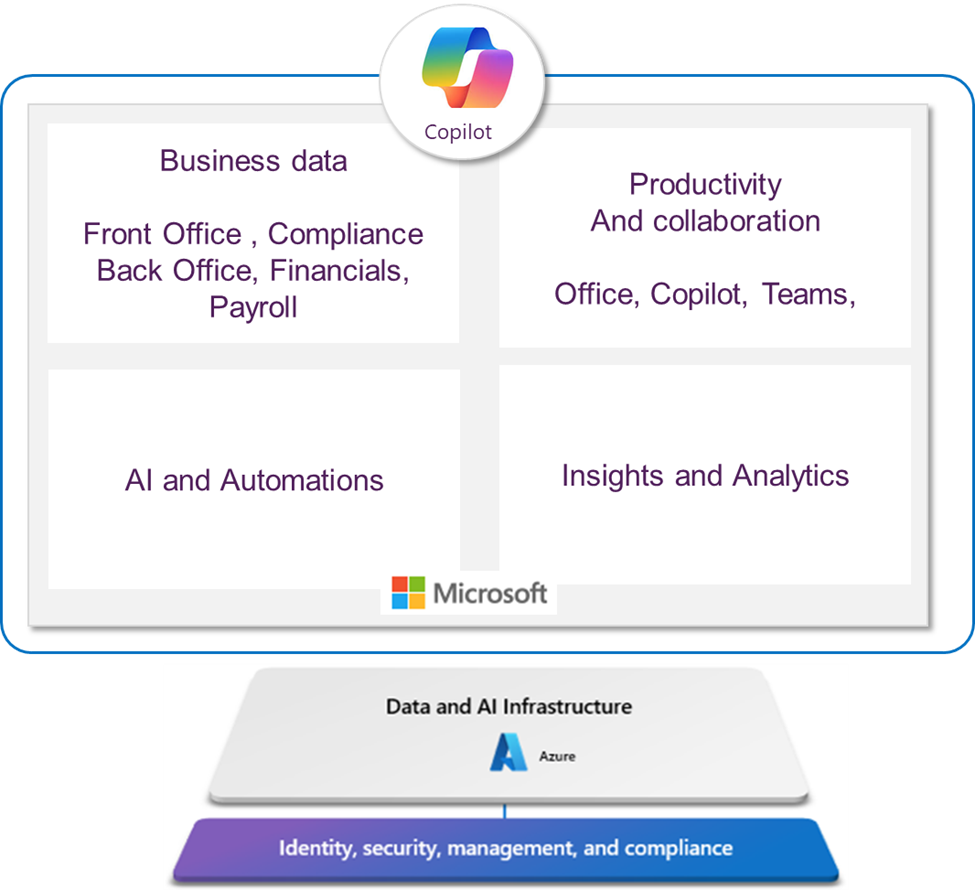
The Microsoft stack is more than familiar tools; it’s a blueprint for simplifying your architecture. With Dataverse at the center and API-first applications wrapped around it, staffing firms can run sales, operations, talent, and finance on a shared data foundation—without middleware glue.
This article breaks down how it works and what it unlocks.
The Core: Dataverse as a Shared Data Model
At the heart of Microsoft’s platform is Dataverse, a standardized set of tables for:
- Accounts, contacts, locations
- Job orders, assignments, activities
- Documents, compliance artifacts
- These tables sync with the Primary record of the Pay/Bill/Financials and Payroll
What this means: You don’t duplicate entities across CRM, ATS, talent portals, and back office. They operate over the same tables, so updates are instantly visible everywhere.
Real-Time by Design: APIs > Batches
Microsoft’s architecture favors real-time APIs rather than file transfers and overnight syncs.
Example scenarios:
- A candidate completes a screening at midnight → It’s immediately visible to recruiters and reporting.
- A job order is updated by sales → Operations sees it live; talent apps reflect changes instantly.
- Time is submitted in the portal → Bill/pay points flow straight into financials with true double-entry accounting.
No staging. No parallel datasets. No lag.
The Lifecycle: From Prospect to P&L in One System
Prospect → Account:
Sales interactions, opportunities, and job orders are linked to the same account record.
Talent → Assignment:
Candidate progression is tracked from application through screening to placement—without duplicating records.
Time → Bill/Pay:
Submitted time creates bill/pay points that hit the financial tables directly, impacting P\&L and balance sheet in real time.
And if you want to add Payroll:
These transactions seamlessly transfer to a comprehensive payroll system, where post-payroll processes are immediately accessible to employees. This gives you the gold standard for staffing—a real-time, fully-burdened view of profitability by placement, temp, and customer.
Outcome: You can trace micro transactions to profit without building parallel reporting environments.
Why This Beats Point Solutions
Point solutions often solve narrow problems and sit outside your core systems, creating:
- Extra mappings and bespoke integrations
- Separate data stores for activity logs
- One-off connectors that don’t scale
Microsoft Platform advantages:
- Reusable connectors and patterns
- Unified security and governance
- AI over raw operational data, not snapshots
- Speed to build: automate, test, promote—in hours, not months
The Back Office Difference: Built for Staffing
Generic ERPs struggle with staffing complexity (multiple cycles, gig pay, VMS flows, MSP terms, pay-when-paid). A Microsoft-first staffing back office (e.g., 1Staff 365) is built to:
- Operate over one set of central tables
- Handle real-time financial impacts
- Support staffing-specific scenarios without parallel architectures
Conclusion
A Microsoft-first architecture eliminates Frankenstack complexity by design. One data model, real-time updates, and financials that understand staffing—this is the foundation AI and automation need.
See a 20-minute demo: Prospect-to-P&L on a Microsoft-first stack.
More from the blog!
Stuck in a Maze of Systems?
In this blog, we’ll look at what a Frankenstack really is, why it’s so damaging to your financial operations, and how an integrated solution like 1Staff on Microsoft Dynamics 365 Business Central replaces chaos with clarity.
Read more...
From GP to Great
Reimagine Your Back Office with 1Staff 365
With Dynamics GP nearing end of life, now is the time to plan your next step. See how 1Staff 365 on Microsoft Dynamics 365 Business Central can modernize your back office with automation, flexibility, and measurable savings.
Read more...