Every staffing executive has now heard the AI pitch. Your recruiters will source faster, your sellers will close more, your back office will run itself. The problem is rarely the AI. It is what the AI can see.
The Problem with Disconnected Data.
Most staffing firms run their business across four or five systems: a CRM for clients, an ATS for candidates, a VMS portal for each MSP program, a time capture tool and a separate finance system for pay and bill. Bolt an AI tool onto any one of them and it gives you a confident answer built on a slice of the truth. Ask it which client is growing and it sees the pipeline but not the fills; ask it why margin is slipping and it sees invoices but not the rate conversation your account manager had last Tuesday.
"The problem is rarely the AI. It is what the AI can see."

One Data Estate. The Complete Picture
1Staff 365 was built the other way. Most staffing platforms connect sales and recruiting through integrations between separate systems. 1Staff extends the Dynamics 365 Sales data model itself into staffing operations.
Imagine one big, carefully curated table for your whole business, where every client has exactly one record. Contacts, opportunities, job orders, candidates, placements and assignments all hang off that record with the same identity, relationships and security, so everyone works from the same 360-degree view. Pay, bill and finance run in a dedicated accounting system of record, kept in step through native Microsoft synchronization rather than third-party middleware. That is why the AI capabilities Microsoft is now shipping matter so much more to a 1Staff firm than to a firm on a stitched-together stack.
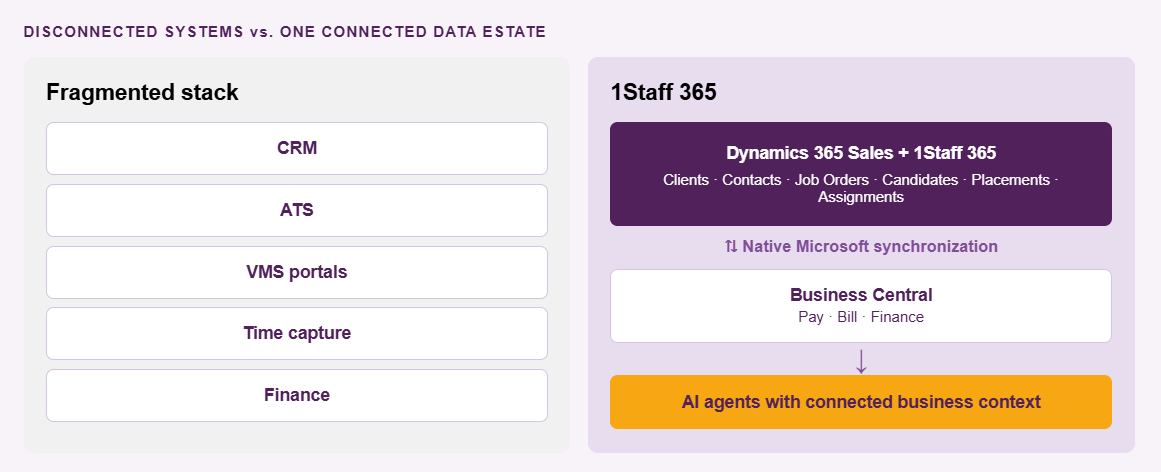
When the Sales Opportunity Agent flags that an MSP enrollment is resting on a single contact, it is reading the same opportunity, contacts and activity history your account manager works in every day. When the Sales Research Agent charts open versus filled demand for a client, it is querying 1Staff job orders directly, not an export from last month. When Microsoft 365 Copilot answers "what did ABC Workforce Solutions say about rate cards last week?", it combines Outlook and Teams with the client record, under the same security your team already has.
When One Update Makes Every Agent Smarter
The agents also build on each other. Data Enrichment pulls a revised start date out of a Teams call and updates the opportunity; the Opportunity Agent's next pass sees a realistic timeline; the Research Agent's pipeline view reflects it; Copilot's summary before the next call includes it. One correction improves every answer downstream, because there is only one place for it to land.
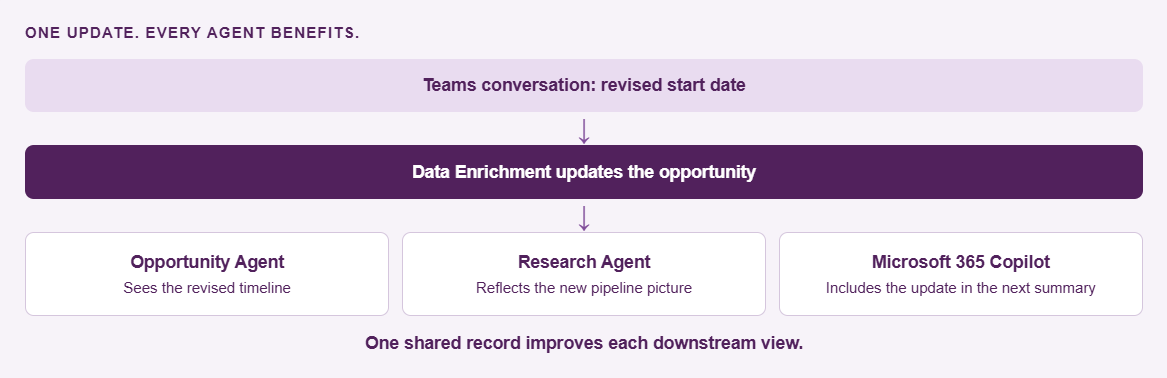
"One correction improves every answer downstream, because there is only one place for it to land."
Better Insights. Better Business Decisions.
It also changes the questions you can ask. Which opportunities have turned into job orders? Which clients are ordering more while fill rates fall? Where is demand growing without placements following it? Those are staffing questions, not CRM questions, and they only have good answers when sales and delivery share the same records. Each Microsoft agent has its own specialty, some focused on leads and opportunities, others ranging across your staffing records, but they all start from the same foundation.
This matters at volume. Take a business that processes more than 1,300 invoices and 2,100 timesheets a week across more than 20 VMS systems. At that scale, an AI that has to sync, map and reconcile a copy of your data is another reconciliation problem. An AI that works where the data already lives is leverage.
In a flat market, growth comes from winning more inside the clients and programs you already serve. That takes knowing which accounts are expanding, which deals are exposed and where fill rates are slipping, faster than your competitors do. The posts that follow walk through each Microsoft agent in a real staffing scenario, and why a single data estate is what makes them worth using.
"An AI that works where the data already lives is leverage."
Company and contact names in this post are fictional and used for illustration only.
Contact us to see and hear more about AI across the 1Staff data estate.
Part 1: Map What You Know
Different Labels. Same Pay Type.
This is Part 1 of our look at how 1Staff Streams takes the manual work out of client data imports. We’ll start with the mappings you already know - translating different client values into consistent 1Staff data without custom scripts or waiting on developer time.
Read the blog...
The Reconciliation Tax Nobody Budgets For.
“The real cost isn’t the mistake, it’s how long it goes undetected.”
Discover how 1Staff helps staffing firms simplify VMS reconciliation, catch discrepancies earlier, reduce manual work, and prevent small errors from quietly eroding margin.
Read more...