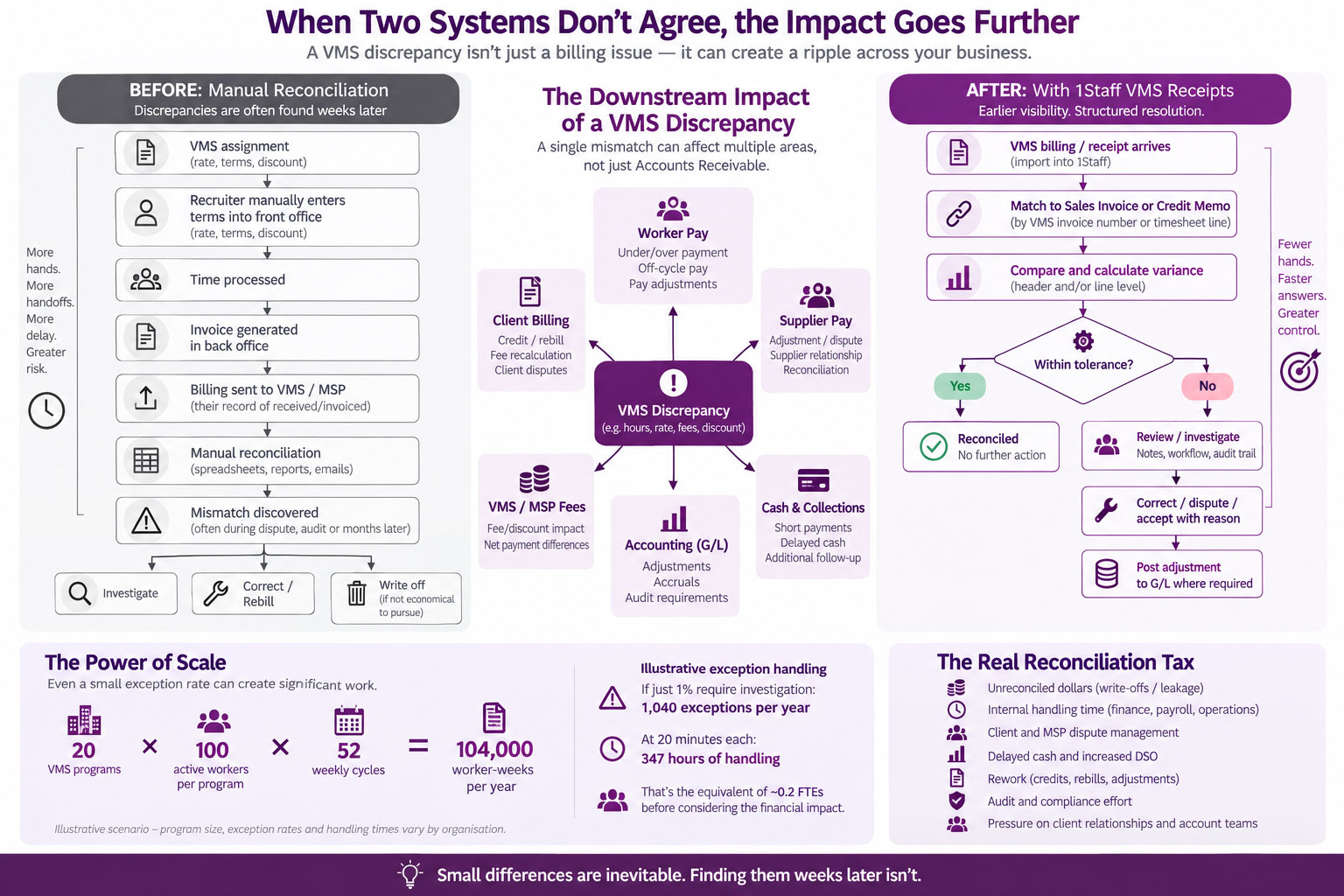
Ask a staffing firm's finance team how they reconcile what a VMS says it received and invoiced against their own AR, and most will describe the same setup: a spreadsheet or two, a person or three, and a recurring block of time on the calendar that never quite goes away. Sound familiar? Depending on the firm's involvement with VMS programs, they might staff several full-time workers, whose job is solely around keeping two systems that should agree with each other from quietly drifting apart.

The cost isn’t the write-off. It’s the repetition.
So, what happens when they disagree? All too often, nothing. Someone finds a mismatch, weighs the cost of tracking it down against what's actually at stake, and decides it isn't worth the effort. So it gets written off. Once or twice is no big deal. If it's a trend, quietly repeating across the firm's VMS programs, these issues compound in a way a single write-off never suggests on its own. A firm running dozens of these programs, each leaking a little unreconciled money month after month, isn't looking at a small number. It's a real, permanent hit to margin that never shows up as one figure anyone points to in a meeting.
Small errors get expensive when nobody is watching.
Picture the ordinary version of this. A new assignment comes in through the VMS, and a recruiter keys the details into the front office system by hand; the rate, the terms, whatever discount the program calls for. Maybe the discount gets missed. Maybe the rate goes in a few cents off. Nothing catches it, because the internal system has no reason to think the number is wrong, it just carries forward whatever was keyed in. The error moves into the back office and sits there, invoice after invoice, quietly compounding for weeks, because bill and pay are separate processes running at high volume. Issues like this usually surface during a billing dispute, or maybe an audit, oftentimes weeks or a month later. The mistake was small. What made it expensive was that nothing was watching for it in the meantime.
“The real cost isn’t the mistake, it’s how long it goes undetected.”
Reconciliation, Built Into the Workflow.
A native VMS Receipt entity fixes the mechanics of this. It lives inside It lives inside 1Staff Back office and connects directly to your own Sales documents, so a receipt has a real link to the invoice or credit memo it belongs to. Reconcile by VMS Invoice Number, matching header to header, or drop to VMS Timesheet Line Number for a line-level view. Either way, the variance between what the VMS reported and what your own numbers say gets calculated the moment the receipt comes in.
A configurable rounding tolerance means a stray penny or two doesn't spin up a dispute nobody has time for. A dispute workflow with notes and audit fields keeps the back-and-forth attached to the record instead of buried in an email thread. And once a variance is resolved, posting it to the G/L takes one click.
VMS programs produce disagreements more often than anyone would like. Different systems, different timing, different ideas about what counts as "received" on a given day. That doesn't go away here. What changes is what happens after. A discrepancy used to sit in a spreadsheet until someone decided chasing it wasn't worth the time. Now it gets flagged and calculated automatically, and the best part? It happens before it's ever processed in the first place.
With 1Staff, VMS reconciliation becomes part of the staffing workflow rather than a separate process sitting off to the side. The VMS Receipt entity connects what the VMS reports directly to the sales documents in 1Staff 365 Back Office, helping finance teams catch discrepancies earlier, resolve them in context, and keep small differences from quietly turning into margin loss.
Bridge to the Cloud 3
Key Dates for 2026–2027
Microsoft has announced Bridge to the Cloud 3 (BTC3), a time-limited licensing promotion for organizations still running Microsoft Dynamics GP and planning a transition to the Microsoft cloud.
Read more...
More from the blog...
When One Bad Week Shouldn't Ruin the Other.
A biweekly timesheet arrives as a single scanned image. Week one is clean: hours logged correctly, signatures in place, nothing to flag. Week two has a problem, maybe an illegible entry, maybe a rate that doesn't match the assignment.
Read the blog...