One client calls standard hours "Reg." Another uses "RG." A third writes "Regular." Three names, one pay type. Getting each client's file to say it in a way 1Staff understood used to mean someone writing a custom script or hand-editing a CSV before the file got anywhere near the system.

Three names. One pay type.
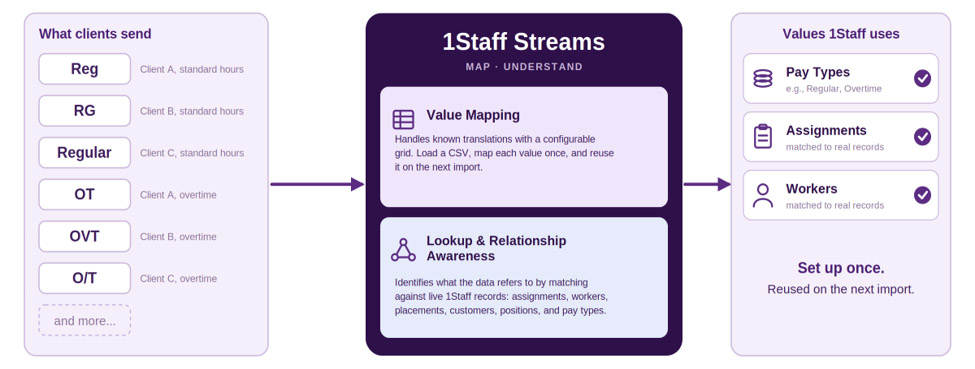
1Staff Streams maps what clients send to the values 1Staff uses.
That someone was almost always a developer. A new VMS, a new timeclock export, a client who did things a little differently, each one queued up behind engineering capacity, whether or not the mapping problem itself was hard. Usually, it wasn't. It was just tedious work stuck in a queue behind people with better things to do.
The simple version.
Here's the familiar pay-type translation:
Source
Incoming value
1Staff value
Client A
Reg
Regular
Client B
RG
Regular
Client C
Regular
Regular
“Simple mapping shouldn’t need engineering time.”
Set it up once and it keeps working on the next import too. Streams handles this right in the column-configuration UI, with two no-code tools.
1.
Value Mapping: handle the translations you already know
A simple grid, source value on one side, output value on the other. Load a CSV and it auto-populates from what's already in the file, so nobody guesses at a client's vocabulary from memory. You can set an optional default for anything unmapped, though go carefully with values that affect pay or billing.
2.
Lookup Mapping: understand what the data refers to
A code only means something in context. Lookup Mapping resolves values against live 1Staff reference data (Assignment, Temp, Placement, Customer, Position, Pay Type), and cross-entity resolution helps when a match depends on more than one value. A confidence indicator flags anything uncertain, and a "Test Lookup" preview checks the mapping against real data before it's saved.
Who gets to do this work.
The bigger shift is who does the work. Configuration that used to sit on a developer's backlog now sits with the teams who understand the client's data, because they're the ones looking at it. They can act on it directly, without waiting in line. Ask your payroll team how nice it would be to configure a new payroll import in less than an hour, instead of a couple of weeks.
Reg, RG, and Regular is the easy case.
Part 2 covers what happens when the next client's file looks nothing like the last one.
See how 1Staff Streams can simplify your data imports.
Part 2: Make the Next File Easier
When One Bad Week Shouldn't Ruin the Other.
This is Part 2 of our look at how 1Staff Streams simplifies client data imports. Once the straightforward mappings are handled, Streams helps teams deal with the harder cases too - using AI-assisted scripting, template recognition, and reusable learning so each new client starts with more of the work already done.
Read the blog...
The Reconciliation Tax Nobody Budgets For.
“The real cost isn’t the mistake, it’s how long it goes undetected.”
Discover how 1Staff helps staffing firms simplify VMS reconciliation, catch discrepancies earlier, reduce manual work, and prevent small errors from quietly eroding margin.
Read more...